Modern life can feel like having twenty browser tabs open at the same time. Work, study, family responsibilities, messages, appointments, personal goals, and countless small tasks all compete for our attention. It is easy to stay busy without actually getting the important things done.
That is where digital productivity tools can help. The right application can give you a clearer view of your responsibilities, reduce distractions, organize information, and make everyday routines easier to manage. But with thousands of options available, how do you know which ones are genuinely useful?
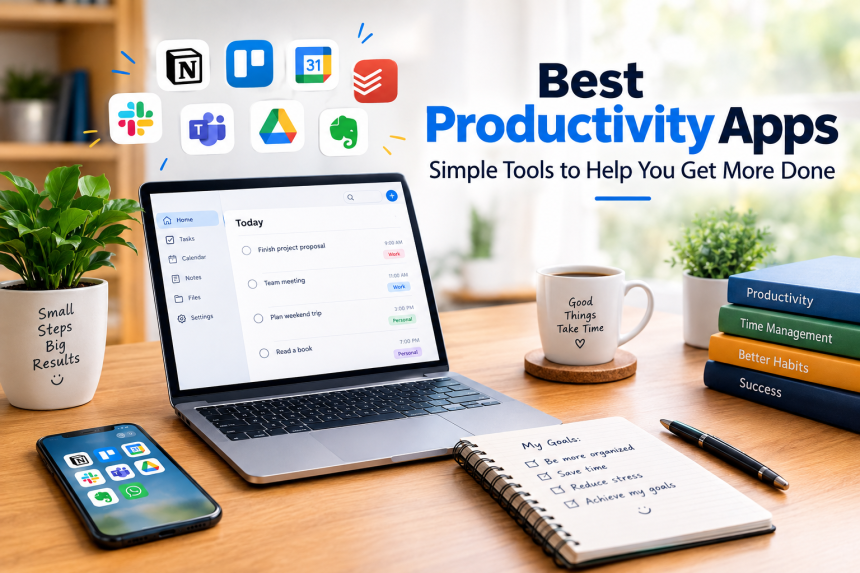
The right choice ultimately depends on your workflow, daily needs, and the way you prefer to stay organized. Some people need a simple task list, while others want a complete workspace for notes, projects, calendars, and collaboration. This guide explores the most useful categories of tools, what they do well, and how you can choose the right ones without making your digital life more complicated.
What Makes a Productivity App Useful?
Before downloading another application, it is worth asking a simple question: What problem am I trying to solve?
A useful tool should make something easier, not create another responsibility. If you spend more time organizing your tasks than completing them, the system is probably too complicated.
The most effective tools usually share several characteristics.
Ease of use: You should be able to understand the basic features quickly. A complicated interface may look impressive, but simplicity often wins when you need to use something every day.
Reliable organization: A good tool gives your information a logical home. Instead of searching through messages, notebooks, and scattered documents, you know where to look.
Accessibility: Many people work across laptops, phones, and tablets. Synchronization allows information to remain available wherever you are.
Reminders and notifications: These can help you remember deadlines, appointments, and important follow-ups. However, too many notifications can become distracting, so customization matters.
Flexibility: Your needs may change. A student might initially need a basic task manager and later require project planning. A professional may begin working alone and eventually need collaboration features.
Think of your digital system as a desk. A good desk helps you find what you need quickly. A bad one simply gives you more drawers to search through.
Task Management Tools for Everyday Responsibilities
One of the simplest ways to become more organized is to stop relying entirely on memory.
Task management applications let you create lists of things you need to accomplish. Depending on the tool, you may be able to add deadlines, priorities, recurring tasks, labels, notes, and reminders.
Popular choices in this category include Todoist, Microsoft To Do, TickTick, Any.do, and Things.
A basic task manager can be surprisingly powerful. Instead of thinking, “I need to remember to pay that bill next Tuesday,” you can record the task immediately and let the application remind you.
This reduces mental clutter.
Todoist is particularly useful for people who want a clean task-focused experience. You can organize responsibilities into projects, assign dates, create recurring tasks, and separate personal work from professional commitments.
Microsoft To Do can be attractive for people already using Microsoft’s ecosystem. Its straightforward design makes it suitable for shopping lists, daily responsibilities, work tasks, and personal reminders.
TickTick combines task management with additional planning features, making it useful for people who want more than a basic checklist.
The important point is not which application has the longest feature list. It is whether you will actually open it, trust it, and keep using it.
Digital Notes and Information Management
How often have you written down an important idea and then forgotten where you put it?
Note-taking software solves this problem by giving you a searchable digital space for information. You can store meeting notes, ideas, research, recipes, study material, project information, checklists, and personal reference material.
Some well-known options include Evernote, OneNote, Apple Notes, Google Keep, and Obsidian.
Each has a different approach.
OneNote works particularly well for people who enjoy organizing information into notebooks and sections. It can be useful for students, researchers, and professionals who collect large amounts of material.
Apple Notes is convenient for people heavily invested in Apple’s devices. Its simple interface makes it suitable for quick notes, lists, scanned documents, and everyday information.
Google Keep is designed around quick capture. It is useful when you want to write down an idea or reminder without creating a complicated structure.
Obsidian takes a more connected approach. Users can link notes together, making it appealing for people who enjoy building a personal knowledge system.
The best approach is to choose a system that matches your thinking style. If you constantly capture small pieces of information, simplicity may be more important than advanced organization.
Calendar and Scheduling Applications
A task tells you what needs to happen. A calendar helps determine when it should happen.
Calendar software is especially useful for people managing appointments, meetings, classes, deadlines, travel plans, and recurring commitments.
Google Calendar, Microsoft Outlook Calendar, and Apple Calendar are among the most widely used options.
A good scheduling habit is to avoid filling every available minute. Leave space between commitments for unexpected work, travel, preparation, and rest.
You can also use separate calendars for different areas of life. For example, one calendar might contain professional commitments while another contains personal appointments.
Color coding can make schedules easier to understand at a glance, but it should remain simple. Ten different colors may look organized while actually making the calendar harder to read.
Another useful practice is combining your calendar with your task system. If something takes only five minutes, a task list may be enough. If it requires two hours of focused work, putting dedicated time on the calendar can make it more likely to happen.
Project Management for Bigger Goals
A simple checklist works well for everyday responsibilities. Larger projects are different.
Imagine organizing a wedding, launching a website, renovating a house, or managing a business campaign. These projects contain dozens or even hundreds of individual tasks. You need to understand not only what needs to happen but also who is responsible, what comes first, and what remains unfinished.
Project management platforms are designed for this purpose.
Popular examples include Trello, Asana, ClickUp, Monday.com, and Jira.
Trello uses boards, lists, and cards. Its visual approach makes it easy to see the stages of a project.
Asana offers task assignments, deadlines, project views, and team coordination features. It can be useful when several people need to work toward the same objective.
ClickUp provides a broad collection of project and work-management features for users who want a more customizable environment.
For technical teams, Jira is commonly used to manage development work and issue tracking.
The key is not to turn every small activity into a project. If you use an advanced project-management system for buying groceries, you may be making your life harder rather than easier.
Communication and Collaboration Platforms
Productivity is not always about working alone. Many people spend a large part of their day communicating with colleagues, clients, classmates, or customers.
Applications such as Slack, Microsoft Teams, Zoom, and Google Meet can make remote and distributed work possible.
Communication platforms allow people to exchange messages, hold meetings, share files, and coordinate activities without being in the same physical location.
However, there is an important downside: communication can easily become the biggest source of distraction.
Constantly checking messages can break concentration. You may begin writing a report, see a notification, respond to it, open another conversation, and suddenly lose twenty minutes.
A better approach is to create boundaries.
Turn off unnecessary notifications.
Check messages at planned intervals when possible.
Use focused working periods for tasks that require concentration.
Move important decisions out of endless chat conversations and into a clear record when appropriate.
The goal is not to communicate less. It is to communicate with greater purpose.
Focus and Time-Management Tools
Sometimes the problem is not organization. You already know what you need to do. The real problem is starting.
Focus applications can help by creating a dedicated environment for concentrated work.
One popular method is the Pomodoro technique, where work is divided into focused sessions followed by short breaks. You can use dedicated timers, calendar blocks, or even a basic clock to follow this approach.
Applications such as Forest, Freedom, RescueTime, and Focus To-Do offer different approaches to concentration and digital distraction.
Website and application blockers can be especially useful if social media or entertainment websites repeatedly interrupt your work.
But technology cannot completely solve a concentration problem. Your environment matters too.
Put your phone away when possible. Close unnecessary browser tabs. Keep only the documents you need open. Tell people when you are unavailable if your work environment allows it.
Think of concentration like a flashlight. When its beam is spread across ten different places, nothing receives enough light. When it is directed toward one task, progress becomes much easier.
File Storage and Document Organization
Digital clutter can be just as frustrating as physical clutter.
Cloud storage services help keep documents available across devices while providing a central location for files.
Common choices include Google Drive, Microsoft OneDrive, Dropbox, and iCloud Drive.
The service you choose may depend heavily on the devices and software you already use.
Good file organization matters just as much as the storage provider. A folder called “Important Stuff” containing hundreds of unrelated documents is not particularly helpful.
Instead, develop a simple structure.
For example:
- Work
- Personal
- Finance
- Projects
- Photos
- Documents
- Archive
Within each folder, use understandable names. Instead of saving a file as document-final-new2.pdf, use something descriptive such as 2026-Business-Plan.pdf.
A consistent naming system saves time later because you can find information without opening dozens of files.
Habit, Routine, and Personal Planning Tools
Productivity is not only about completing today’s tasks. Long-term progress also depends on repeated behavior.
Habit-tracking applications can help you monitor activities such as reading, exercise, studying, writing, meditation, or practicing a skill.
Apps such as Habitica, Streaks, Loop Habit Tracker, and Done take different approaches to this idea.
Some focus on simple streaks. Others use rewards or visual progress.
The important thing is to avoid tracking too many habits at once. If you create a list of twenty new behaviors on January 1, keeping up with all of them may become exhausting.
Start with one or two.
For example, instead of saying, “I will completely change my lifestyle,” create a manageable habit such as:
Read for 15 minutes each evening.
Once that becomes routine, you can add another behavior.
Small actions may appear insignificant on an individual day, but repeated actions can create meaningful results over time.
How to Choose the Right Tool for You
There is no universal winner because productivity is personal.
A freelancer may need project management, time tracking, invoicing, and client communication. A student may care more about notes, deadlines, calendars, and study sessions. A parent may simply need reminders, shopping lists, and a shared calendar.
Start by identifying your biggest problem.
If you forget tasks: try a task manager.
If you lose information: try a note-taking system.
If appointments overwhelm you: improve your calendar setup.
If large projects feel confusing: use project management software.
If distractions are the problem: experiment with focus tools.
If files are scattered everywhere: organize your cloud storage.
You should also consider cost. Many applications provide free versions, while advanced features may require subscriptions. Before paying, use the free version long enough to determine whether the tool genuinely improves your routine.
Another important factor is compatibility. A tool that works beautifully on your computer but poorly on your phone may become frustrating if you move between devices frequently.
Finally, consider privacy. Read the provider’s privacy information before storing sensitive documents, personal information, or confidential business material.
Building a Simple Productivity System
Downloading ten applications does not automatically make someone organized.
In fact, having too many tools can create another form of clutter.
A simple system might require only four components:
One task manager for things you need to do.
One calendar for appointments and time-specific commitments.
One notes system for information and ideas.
One storage service for documents and files.
That may be enough for many people.
You can then connect these pieces through your habits rather than searching for complicated automation.
For example, when you receive a new responsibility, record it in your task manager. If it must happen at a particular time, put that event on your calendar. If you receive supporting information, save it in your notes or files.
Once this becomes routine, your system begins working almost automatically.
The objective is not to build the most sophisticated setup. The objective is to create a system you can maintain when life becomes busy.
Common Productivity Mistakes to Avoid
Even good tools can become counterproductive when used incorrectly.
Using too many applications: Switching between different platforms can consume time and attention.
Constantly reorganizing: You do not need to redesign your system every weekend. Give it time to work.
Overloading your task list: A list containing fifty tasks can feel impossible. Identify what genuinely matters today.
Treating every task as urgent: If everything is urgent, nothing has a meaningful priority.
Ignoring breaks: Rest is not the opposite of productivity. Regular breaks can help you maintain concentration over longer periods.
Relying entirely on notifications: Notifications should support your memory, not control your attention.
Choosing features over usability: A tool with 100 features is not necessarily more useful than one with 10.
Perhaps the biggest mistake is expecting an application to fix an unclear goal. Software can organize your work, but it cannot decide what matters to you.
Final Thoughts
The most useful digital tool is not necessarily the newest, most expensive, or most feature-packed option. It is the one that solves a real problem and fits naturally into your routine.
Start small. Choose one area that causes the most friction and improve it first. Once that becomes comfortable, add another tool only if you genuinely need it.
Productivity is ultimately about making room for the things that matter. The technology is simply there to help you get there with less confusion and wasted effort.
FAQs
1. What should I look for when choosing a productivity app?
Look for ease of use, reliability, synchronization, useful reminders, compatibility with your devices, and features that address a specific problem. A simple tool that you consistently use is usually more valuable than a complicated platform you rarely open.
2. Can productivity apps really save time?
Yes, when they reduce repetitive work, improve organization, prevent missed deadlines, or make information easier to find. However, spending excessive time configuring and maintaining these tools can have the opposite effect.
3. How many productivity apps should I use?
There is no fixed number. For many people, a task manager, calendar, notes application, and cloud-storage service provide a strong foundation. Add other tools only when they solve a clear need.
4. Are free productivity apps good enough?
For many users, yes. Free plans often provide the essential features needed for task lists, notes, calendars, or basic collaboration. Paid versions may become worthwhile when you need advanced features, larger storage, automation, or team capabilities.
5. What is the easiest way to become more organized?
Start by choosing one place to record your tasks and one place to manage your schedule. Write down responsibilities instead of relying on memory, review your list regularly, and focus on a small number of meaningful priorities each day.