Working from home once seemed like a temporary arrangement. Today, it has become a normal part of professional life for many people. Employees, freelancers, business owners, students, and teams can work from different cities, countries, or even time zones while staying connected through digital tools.
But working remotely is not simply a matter of taking a laptop home. Without the right setup, messages can get lost, meetings can become confusing, files may end up in the wrong place, and a simple task can take far longer than expected. So, what makes remote work actually work?
The answer is a combination of good habits and reliable technology. The right software can help people communicate, manage projects, share documents, track progress, protect information, and stay focused without constantly asking, “Where is that file?” or “Did anyone finish this task?”
What Is Remote Work Software?
Remote work software refers to digital applications and online platforms that help people perform their jobs when they are not working together in the same physical office.
These tools cover a wide range of needs, making it easier to find the right solution for every task. Some are designed for video meetings, while others help with project planning, document sharing, employee communication, time tracking, customer support, or cybersecurity.
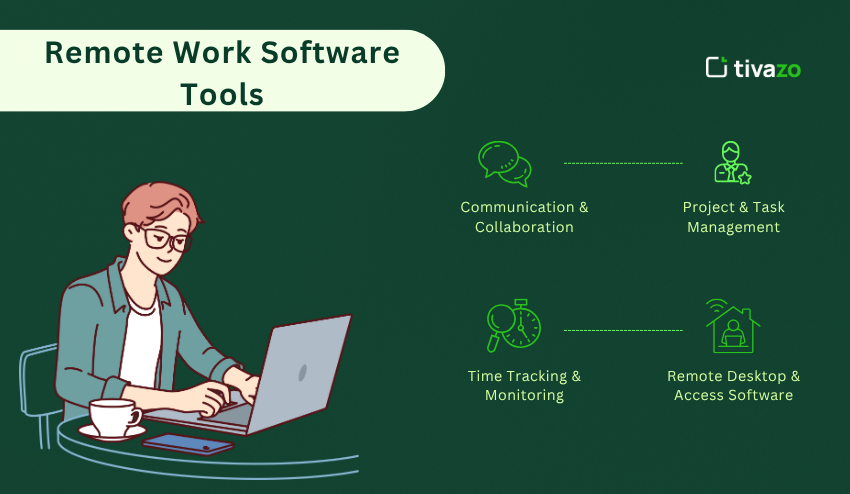
Popular platforms include Microsoft Teams, Slack, Zoom, Google Workspace, Asana, Trello, ClickUp, Dropbox, and Microsoft OneDrive. Each one serves a slightly different purpose, and many organizations use several tools together.
For example, a small team might use a communication platform for daily conversations, a project manager for assignments, cloud storage for documents, and video conferencing software for meetings.
Think of this software as a virtual office. Instead of having a meeting room, filing cabinet, whiteboard, reception desk, and hallway conversation in one building, you recreate those functions digitally.
The goal is not to use as many applications as possible. In fact, too many platforms can make remote work more confusing. The goal is to create a simple digital environment where everyone knows how to communicate, find information, and complete responsibilities.
Why These Tools Matter for Distributed Teams
When everyone works under the same roof, communication often happens naturally. You can walk over to someone’s desk, ask a quick question, point at a document, or have a five-minute conversation after a meeting.
Remote workers do not have that luxury.
A person working from home may be several hours away from their colleagues. Another employee might be traveling. Someone else could be working from a completely different time zone.
Digital tools help bridge that physical distance.
Communication: Team members can exchange messages without waiting for an in-person conversation.
Collaboration: Several people can work on the same document or project without being in the same room.
Organization: Tasks, deadlines, and responsibilities can be recorded instead of being remembered informally.
Accessibility: Information can be available from a laptop, tablet, or smartphone.
Flexibility: Employees can work from different locations while remaining connected to their organization.
There is also a major benefit for managers. A well-organized system makes it easier to understand what is happening without constantly interrupting employees for updates.
However, technology should support people rather than create pressure. A remote employee does not need to answer every message immediately simply because the message arrived through an app.
Good software creates clarity. Poorly managed software creates noise.
Video Conferencing for Face-to-Face Communication
One of the biggest challenges of remote work is maintaining meaningful communication.
Text messages are useful, but they cannot always replace a conversation. Sometimes a complicated subject can be explained in ten minutes on a video call instead of taking an hour through back-and-forth messages.
Video conferencing platforms such as Zoom, Google Meet, and Microsoft Teams are widely used for this reason.
They allow teams to conduct meetings, interviews, training sessions, presentations, consultations, and one-on-one conversations.
Good video meeting habits matter.
Before scheduling a meeting, ask whether the discussion actually requires one. If a short message or shared document can solve the issue, another meeting may not be necessary.
When a meeting is needed, create a simple agenda. Participants should know why they are attending and what needs to be discussed.
It is also helpful to establish a few basic rules. People should know when to mute themselves, how questions will be handled, whether cameras are expected, and where follow-up information will be stored.
Meeting recordings can also be useful for training or for colleagues who cannot attend. However, organizations should consider privacy and local rules before recording conversations.
The best virtual meetings are usually not the longest ones. They are the ones where everyone leaves knowing what was discussed and what happens next.
Team Messaging and Everyday Communication
Email remains useful, but it is not always the best choice for quick team conversations.
Messaging platforms such as Slack and Microsoft Teams allow people to communicate through channels, direct messages, group conversations, and shared files.
A well-organized messaging system can make remote collaboration feel much more natural.
For example, a company could create separate channels for:
- General announcements
- Marketing
- Customer support
- Product development
- Specific projects
- Social conversations
This structure makes information easier to find.
However, messaging can quickly become overwhelming. If every minor update produces a notification, employees may feel as though they are permanently on call.
Set communication expectations.
Teams should decide which messages require immediate attention and which can wait. Important decisions should also be documented somewhere reliable rather than buried inside a long chat.
Another useful habit is using descriptive channel names and keeping conversations connected to their proper topic. This saves time when someone needs to search for information several weeks later.
Remote communication works best when people understand that being available online does not necessarily mean being available every second.
Project Management and Task Organization
One of the hardest parts of working remotely is knowing who is responsible for what.
In a traditional office, someone may casually mention that a report needs to be finished. In a remote environment, that conversation can easily disappear unless the responsibility is recorded.
Project management platforms such as Asana, Trello, ClickUp, Monday.com, and Jira help solve this problem.
These platforms can organize projects into tasks, deadlines, stages, assignments, and progress updates.
For example, imagine a team preparing to launch a new website. Instead of keeping everything inside email conversations, the project could contain tasks such as:
Write website copy
Create graphics
Review product information
Test the contact form
Check mobile compatibility
Publish the website
Each task can have an owner and deadline.
This simple structure creates accountability without requiring a manager to send constant reminders.
Different visual formats can also help. A board view may be useful for seeing tasks move through stages such as “To Do,” “In Progress,” and “Completed.” A calendar view can help people understand upcoming deadlines.
The important thing is to keep the system realistic. If employees spend more time updating task statuses than doing actual work, the process needs to be simplified.
Cloud Storage and File Sharing
Where did you save the latest version of that document?
This question can become surprisingly common in remote teams.
Cloud storage reduces this problem by providing a shared online location for documents and other files. Services such as Google Drive, Dropbox, Microsoft OneDrive, and Box allow users to store and access information from different devices.
Instead of emailing large attachments back and forth, team members can often share a single document.
This can also reduce confusion about versions.
Imagine that five people have copies of the same presentation. One person changes slide six, another changes slide eight, and someone else sends an older version to a client. Which file is correct?
A centralized system makes this much easier to manage.
Use clear folder structures.
Create logical categories based on projects, departments, clients, or years. Give files descriptive names and avoid vague labels such as “Final,” “Final2,” or “New Final Version.”
Permissions are equally important. Not every employee needs access to every document. Sensitive information should be available only to people who genuinely require it.
A good storage system should make files easy to find while keeping private information appropriately protected.
Productivity and Focus Tools
Working remotely can offer greater freedom, but freedom can also create distractions.
At home, there may be household chores, family interruptions, social media, television, notifications, or simply the temptation to check your phone every few minutes.
Productivity applications can help people create structure around their working day.
Task lists can identify priorities. Digital calendars can reserve time for important work. Focus timers can divide the day into manageable periods. Website blockers can reduce access to distracting services during concentrated work.
Some people prefer working in short sessions followed by breaks. Others prefer longer periods of uninterrupted concentration.
There is no single method that works for everyone.
The important question is: What repeatedly pulls your attention away from the work that matters?
If notifications are the problem, reduce them. If unclear priorities are the issue, plan your day before starting. If meetings consume too much time, review whether every meeting is necessary.
Software can provide support, but it cannot replace good judgment.
A useful digital routine should feel like a map rather than a set of chains. It should show you where to go without controlling every step.
Time Tracking and Work Planning
Time can be difficult to understand when you work independently.
A project may feel as though it took two hours when it actually consumed five. Alternatively, a task that looked complicated may have been completed in less time than expected.
Time-tracking tools can provide useful information.
Applications such as Toggl Track, Clockify, and Harvest allow users to record how much time they spend on different activities.
This can be particularly useful for freelancers who bill clients by the hour. Businesses may also use time information to understand project costs and workloads.
But tracking every minute is not necessary for everyone.
Some people find it useful to monitor time for a few weeks and then use that information to improve planning. For example, you may discover that administrative work takes far longer than expected, while another activity can be completed quickly.
The information can then help you make more realistic schedules.
Time tracking should ideally be used as a learning tool, not simply as a surveillance mechanism. Employees are more likely to benefit from it when they understand why information is being collected and how it will be used.
Security and Privacy for Remote Workers
Convenience should never come at the expense of security.
Remote workers often access company information through home networks, personal devices, public Wi-Fi, and cloud services. Each connection creates potential risks.
Basic security practices can make a major difference.
Use strong, unique passwords.
Avoid using the same password for multiple important accounts. A password manager can help store complex credentials securely.
Enable multi-factor authentication.
This adds another layer of protection beyond a password.
Keep software updated.
Security updates often address known weaknesses, so delaying updates can leave devices unnecessarily exposed.
Be careful with links and attachments.
A message that appears to come from a colleague may not actually be legitimate. Check unexpected requests carefully, especially when they involve payments, passwords, or sensitive documents.
Protect your home network.
Use a strong router password and keep network equipment updated.
Control access to shared files.
Only give people the permissions they need.
Organizations may also use virtual private networks, endpoint protection, device management, and other security measures depending on their requirements.
Security does not have to be complicated. The best approach is often a collection of simple habits practiced consistently.
Software for Employee Collaboration and Shared Documents
Remote work often requires several people to edit, review, and discuss the same material.
Online document platforms can make this process much easier.
Tools such as Google Docs, Microsoft Word for the web, and Microsoft 365 allow multiple users to collaborate without constantly exchanging attachments.
A writer can prepare a document while another person reviews it. A manager can leave comments. A colleague can suggest changes. Everyone can work from a shared version.
This approach can dramatically reduce unnecessary email.
Shared spreadsheets are also useful for budgets, schedules, inventories, project information, and planning.
Presentation tools can support remote training and sales meetings.
The bigger advantage is continuity. If someone is unavailable, another team member can often access the latest information rather than waiting for that person to return.
However, shared documents still need organization. Establish naming conventions, ownership rules, and appropriate access permissions. Otherwise, a shared drive can become just as messy as an overcrowded desktop.
Choosing the Right Tools for Different Types of Workers
Not everyone needs the same digital setup.
A freelancer may need invoicing, time tracking, video calls, file sharing, and client communication.
A small business might need customer management, team messaging, project planning, accounting, and document storage.
A large organization may require advanced security, employee management, analytics, and integrations between multiple systems.
Students working remotely may need video calls, shared documents, calendars, notes, and task lists.
Even two people doing the same job may prefer different applications.
When choosing software, start with your actual needs rather than popularity.
Ask yourself these questions:
What type of work do I perform every day?
How many people need access?
Do I work across multiple devices?
Do I need real-time collaboration?
Will I handle sensitive information?
How much am I willing to spend?
Does the application integrate with tools I already use?
Is it easy enough for everyone to learn?
It is also wise to test software before committing to a long-term subscription. A free trial can reveal whether a platform genuinely improves your workflow.
Remember, the most advanced platform is not automatically the best fit.
How to Build a Simple Remote Work Setup
You do not need twenty applications to create a productive remote environment.
Start with the basics.
Communication: Choose one primary channel for everyday team conversations.
Meetings: Use one dependable video platform.
Tasks: Select a single place where assignments and deadlines are recorded.
Documents: Keep important files in organized cloud storage.
Calendar: Use one shared scheduling system when coordination is required.
Security: Protect accounts with strong passwords and additional verification.
Once these foundations are working, consider adding specialized tools.
For example, a design team may need creative collaboration software. A sales department may require customer management software. A development team may need code repositories and issue tracking.
The key is integration.
If one application contains customer information, another contains tasks, and a third contains documents, connecting those systems can reduce repeated data entry and make information easier to access.
At the same time, avoid adding integrations simply because they are available. Every additional connection can introduce complexity.
Your digital workplace should feel like a clean workspace: everything important has a place, and you can reach it without searching through piles of unnecessary information.
Common Mistakes to Avoid
Technology can solve many problems, but it can also create new ones.
One common mistake is using too many platforms. When employees have to check six different applications every morning, important information can easily be missed.
Another mistake is expecting instant responses. Remote workers need time for focused tasks. Constant interruptions can make complicated work much harder.
Too many meetings are another concern. A calendar filled with video calls leaves little room for actual project work.
Poor documentation can also create trouble. If decisions are made during calls but never recorded, employees who were absent may struggle to understand what happened.
Some organizations also make the mistake of measuring activity instead of results. Seeing someone online does not necessarily tell you whether meaningful work is being completed.
Finally, do not overlook human connection.
Remote work is digital, but the people using these tools are not. Employees still need recognition, conversation, support, and opportunities to build relationships.
Software should make human collaboration easier rather than turning work into a collection of notifications and status indicators.
The Future of Remote Work Technology
Remote work tools continue to evolve.
Artificial intelligence is increasingly being incorporated into workplace applications to summarize meetings, organize information, draft content, automate repetitive tasks, and help users search large collections of data.
Automation can also reduce routine administrative work. For example, a completed form might automatically create a task, notify a team member, and store a document in the appropriate folder.
Better integration between platforms is another important development. Instead of switching between several applications, workers may increasingly interact with connected systems from a central workspace.
At the same time, privacy and security will remain important concerns. As more business information moves online, organizations will need to think carefully about access, data storage, authentication, and responsible use of emerging technologies.
The future is unlikely to be about one magical application that does everything. Instead, successful remote environments will probably depend on tools that work together smoothly while remaining simple enough for ordinary people to use.
Conclusion
Remote work becomes much easier when technology removes friction instead of adding to it. Communication platforms can keep teams connected, project tools can clarify responsibilities, cloud storage can organize files, and security software can protect valuable information.
But software alone does not create a successful remote workplace. Clear expectations, thoughtful communication, reasonable schedules, and trust are equally important.
Start with the problems you actually face. Choose a small set of reliable tools, create simple routines, and adjust the system as your needs change. When your technology works quietly in the background, you can spend less time managing work and more time actually doing it.
FAQs
1. What software is essential for remote work?
Most remote workers can begin with a communication platform, video meeting tool, task manager, calendar, cloud storage service, and secure document system. The exact combination depends on the type of work and the size of the team.
2. Is remote work software expensive?
Not necessarily. Many popular services offer free plans or affordable options for individuals and small teams. Larger organizations may need paid plans for advanced administration, storage, security, and collaboration features.
3. How can remote teams communicate effectively?
Teams can improve communication by choosing clear channels for different topics, documenting important decisions, setting response expectations, and avoiding unnecessary meetings. Regular check-ins can also help employees stay connected without creating constant interruptions.
4. Is cloud software safe for remote workers?
Cloud services can provide strong security, but users still need to protect their accounts and control access carefully. Strong passwords, multi-factor authentication, software updates, and sensible sharing permissions can reduce common risks.
5. How many tools should a remote worker use?
There is no ideal number for everyone. A small collection of tools is often easier to manage than a large collection of overlapping applications. Start with the essentials and add specialized software only when it solves a genuine problem.