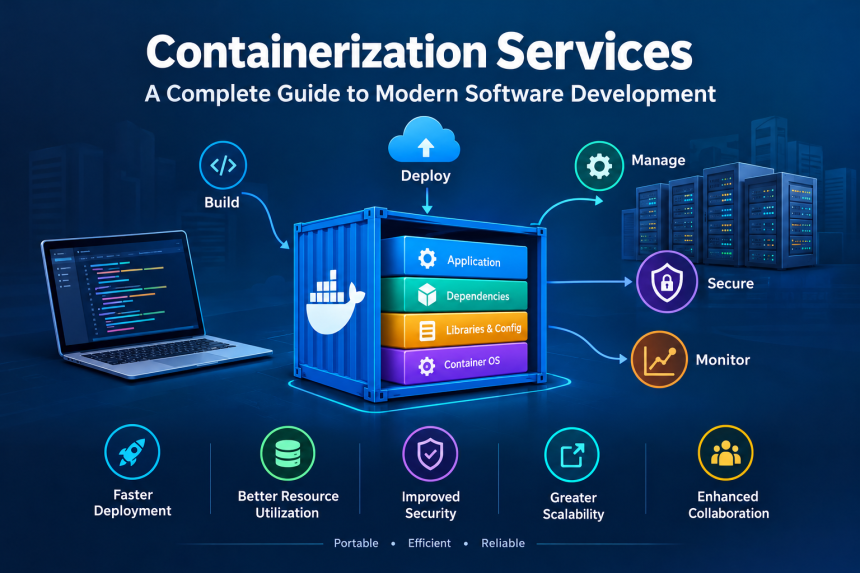
1. Introduction to Containerization Services
Imagine being able to pack an entire application, along with everything it needs to run, into a small, portable package that works almost anywhere. That is the basic idea behind containerization. It has become an important part of modern software development because businesses need applications that are fast, reliable, flexible, and easy to manage.
Containerization services help developers package software and its dependencies into isolated units called containers. These packages can run across different environments, including personal computers, company servers, private data centers, and cloud platforms. As a result, teams can develop, test, and deploy applications with fewer compatibility problems.
Whether you run a small online store, manage a growing company, or simply want to understand modern technology, learning about this approach can help you see how digital services operate behind the scenes. From improving deployment speed to supporting large-scale applications, it offers practical benefits for organizations of many sizes.
2. What Are Containerization Services?
Containerization services provide the tools, technologies, and expert support needed to package, deploy, manage, and secure applications in portable containers, ensuring consistent performance across different computing environments. They help organizations move applications from development to production without repeatedly rebuilding their operating environments.
A container packages an application along with all the necessary files, libraries, dependencies, and configuration settings required to run it reliably across different computing environments.. Unlike a traditional virtual machine, however, a container usually shares the host operating system’s kernel while maintaining isolation from other containers.
Think of containers as shipping boxes. Each box holds its own goods, has clear handling requirements, and can be moved between suitable locations without repacking everything inside. Similarly, a software container carries the components needed to run an application across compatible computing environments.
What Do These Services Include?
Container-related services may cover several activities:
- Container creation: Packaging application code and dependencies into portable images.
- Deployment: Running containers on servers or cloud infrastructure.
- Orchestration: Coordinating containers across multiple machines.
- Security management: Scanning images, controlling access, and applying updates.
- Monitoring: Tracking application performance, resource consumption, and errors.
- Maintenance: Managing configuration changes, upgrades, backups, and troubleshooting.
Some organizations handle these tasks internally, while others work with specialist providers to design and operate their container environments. The right choice depends on technical expertise, budget, application complexity, and business goals.
3. How Containerization Works
The process begins when developers prepare an application and define the components required to run it. Developers define the steps needed to package an application and its dependencies into a container image, typically using a file called a Dockerfile.
A container image is a self-contained package that includes an application and all the dependencies required to run it.. When the image runs, it creates a container, which is the active instance of that package.
Although the process may sound complicated, the basic workflow is straightforward.
Step 1: Build the Application Image
Developers write application code and configure the environment required to run it.. A container-building tool then combines the required components into an image.
Step 2: Test the Container
The image is tested to check whether the application starts correctly, communicates with other services, and performs as expected. Testing also helps identify configuration errors and security weaknesses.
Step 3: Store and Share the Image
Once approved, the image can be stored in a container registry. A registry acts like a library where teams keep and distribute approved application images.
Step 4: Deploy the Container
The image is downloaded to a suitable environment and started as a container. This environment might be a developer’s computer, a physical server, a virtual machine, or a cloud platform.
Step 5: Monitor and Update
After deployment, teams monitor performance, apply security patches, and release updated images when necessary. Automated systems can replace outdated container instances with newer versions.
For larger applications, orchestration platforms can automate many of these tasks. They help decide where containers should run, restart failed instances, and adjust the number of running containers when demand changes.
4. Main Types of Containerization Services
Different organizations require different levels of support. Some only need tools for building application images, while others need a complete platform that manages hundreds or thousands of containers.
Container Development and Packaging
These services help developers create consistent application images. They establish repeatable build processes, organize dependencies, and reduce differences between development and production environments.
This is particularly useful for teams working on applications that rely on multiple libraries, programming languages, or supporting services.
Container Orchestration
Orchestration services coordinate containers across multiple servers. They manage scheduling, scaling, service discovery, and recovery when a container or machine fails.
Kubernetes is a widely used orchestration platform. It can be powerful for complex applications, although it requires appropriate configuration and ongoing management.
Managed Container Platforms
Managed services allow businesses to run containers without maintaining every part of the underlying infrastructure themselves. Depending on the provider, the service manages server infrastructure, platform updates, scaling, and certain security controls.
Examples include Amazon Elastic Container Service, Amazon Elastic Kubernetes Service, Azure Kubernetes Service, and Google Kubernetes Engine.
Container Security Services
Security-focused services help identify vulnerable software packages, protect sensitive credentials, control permissions, and check container configurations. They may also enforce policies that determine which images can be deployed.
Consulting and Migration Services
Specialist consultants assess existing applications and determine whether they are suitable for containerization. They may redesign deployment processes, migrate workloads, train employees, and establish monitoring systems.
Selecting the appropriate service begins with understanding the application rather than choosing the most sophisticated technology available.
5. Key Benefits of Containerization
Containers have gained popularity because they solve many common challenges in software development and operations.
Consistency Across Environments
Have you ever seen an application work perfectly on one computer but fail on another? Variations in installed libraries, software versions, and configuration settings can lead to these issues.
Containers help reduce these inconsistencies by packaging application dependencies into a repeatable image.Although differences in operating systems, permissions, networking, and external services may still occur, containers provide a more consistent and predictable runtime environment.Is this conversation helpful so far?
Faster Development and Deployment
Container images can be built, tested, stored, and deployed through automated workflows. Development teams can release changes more frequently because they spend less time preparing individual environments.
This does not automatically make every application faster, but it can make the process of delivering software more efficient.
Efficient Resource Usage
Traditional virtual machines often include separate operating systems, which can consume additional memory and storage. Containers generally share the host kernel, allowing many workloads to run on the same machine with less overhead.
Actual efficiency depends on the application’s workload, isolation requirements, and resource configuration.
Improved Scalability
When more users visit a website or use an application, additional container instances can be started to handle the increased demand. When traffic falls, unnecessary instances can be removed.
This flexibility is particularly useful for online stores, streaming services, booking platforms, and applications with seasonal traffic.
Better Team Collaboration
Developers, testers, and operations staff can work with the same versioned images and deployment definitions. This creates a clearer workflow and helps teams investigate problems more consistently.
Together, these benefits can improve software delivery, but they are strongest when containerization is supported by good development practices and appropriate infrastructure.
6. Containerization vs. Virtualization
Containerization and virtualization both allow multiple workloads to share physical hardware, but they work differently.
Virtual machines use a hypervisor to create separate virtual computers. Each virtual machine normally runs its own operating system, along with its applications. Containers usually share the host operating system’s kernel while isolating application processes and resources.
Understanding the Main Differences
| Feature | Containers | Virtual Machines |
|---|---|---|
| Operating system | Usually shares the host kernel | Typically includes its own guest operating system |
| Startup time | Often seconds or less | Often longer, depending on configuration |
| Resource usage | Generally lower overhead | Generally higher overhead |
| Isolation | Process and resource isolation | Separate virtual machine boundary |
| Portability | Portable across compatible container environments | Portable across compatible virtualization platforms |
| Common uses | Microservices, application deployment, CI/CD | Legacy applications, operating systems, stronger workload separation |
Neither approach is universally better. Containers are often suitable for applications that need rapid deployment and efficient scaling. Virtual machines remain valuable when workloads require different operating systems or a separate operating system boundary.
Organizations can also use both technologies together. For example, a company might run a Kubernetes cluster on virtual machines, with each machine hosting multiple containers.
This combined approach brings together the flexibility of containers and the infrastructure isolation offered by virtualization.
7. Popular Tools and Platforms
Several tools make it easier to build, run, and manage containerized applications. Understanding their roles can help you choose the right technology for a particular project.
Docker
Docker provides tools for building and running container images. It is widely used by developers who want a consistent way to package applications and test them locally before deployment.
Its image-building workflow and supporting ecosystem make it a common starting point for learning container technology.
Kubernetes
Kubernetes automates the management of containerized workloads. It supports deployment, scaling, service discovery, and recovery from certain failures.
It is particularly useful when an application contains multiple services or needs to operate across several machines. However, smaller projects may not require its full capabilities.
Container Registries
Registries store and distribute container images. Examples include Docker Hub, Amazon Elastic Container Registry, Azure Container Registry, and Google Artifact Registry.
A registry helps teams maintain approved images and control how those images are shared.
Cloud Container Services
Cloud providers offer platforms that simplify container deployment and management. Some provide managed Kubernetes environments, while others offer services that run containers without requiring customers to manage a complete orchestration cluster.
Continuous Integration and Continuous Delivery Tools
CI/CD tools automate steps such as building images, running tests, scanning for vulnerabilities, and deploying approved releases. This reduces repetitive manual work and makes software delivery more consistent.
These technologies serve different purposes, so an effective setup usually combines a small number of tools rather than adopting every available platform.
8. Common Use Cases Across Different Industries
Container technology is not limited to large technology companies. It supports a wide range of industries, from online retail and healthcare to education and financial services. Its usefulness comes from making applications easier to deploy, update, and operate in different computing environments.
E-Commerce and Online Shopping
Online stores often experience unpredictable traffic. Sales events, holiday promotions, and special discounts can bring thousands of additional visitors within minutes.
Containers allow businesses to run separate services for product catalogs, customer accounts, shopping carts, and payment processing. If traffic increases on the product catalog, for example, the business may scale that service without increasing every other part of the application.
This flexibility can help maintain a smoother shopping experience. However, payment security, database performance, and reliable inventory management remain essential.
Healthcare and Medical Technology
Healthcare organizations use software to manage appointments, patient records, laboratory systems, and digital consultations. Containers can help teams deploy these applications consistently across development, testing, and production environments.
Because medical information is sensitive, containerized healthcare systems must also follow applicable privacy regulations, access-control requirements, and data-protection practices. Containers alone do not make an application compliant or secure.
Banking and Financial Services
Financial institutions need dependable systems for account management, transaction processing, reporting, and customer communication. Containerization can support more frequent software updates and help teams separate different application components.
Nevertheless, financial applications require careful testing, strong authentication, detailed audit records, and reliable recovery procedures. Performance and consistency are especially important when money is involved.
Education and Online Learning
Educational platforms may serve students from different locations and experience changing demand during examinations, registration periods, and online classes.
Containers can help these platforms scale learning applications, course-management systems, and supporting services as usage changes.
Media and Entertainment
Video platforms, digital publishing services, and gaming companies often manage large numbers of users and frequent content updates. Containers can help distribute workloads across infrastructure and make it easier to deploy new features.
Across these industries, the central advantage is flexibility. Organizations can adapt their software environments to changing requirements without rebuilding every application component from scratch.
9. Security, Reliability, and Maintenance
Although containers offer many advantages, they also introduce responsibilities that businesses should understand before adopting them. A poorly maintained container environment can expose applications to vulnerabilities, service interruptions, and unnecessary costs.
Keep Container Images Updated
Every container image contains software components that may develop security weaknesses over time. Organizations should regularly scan images for known vulnerabilities and rebuild them using maintained dependencies.
Using trusted base images and removing unnecessary packages can reduce the number of components that need attention.
Apply the Principle of Least Privilege
Containers should receive only the permissions they need to perform their assigned tasks. Running processes as an administrator or granting broad access to the host can increase the impact of a security incident.
Access to container registries, deployment tools, and production environments should also be restricted to authorized users.
Protect Sensitive Information
Passwords, API keys, and other confidential credentials should not be casually embedded in container images. Dedicated secrets-management systems can help control how sensitive values are stored and supplied to applications.
Encryption, secure communication, and appropriate access policies provide additional protection.
Monitor Applications and Infrastructure
Monitoring helps teams detect unusual resource consumption, failed requests, slow response times, and unexpected container restarts.
Logs, metrics, and alerts provide valuable evidence when investigating problems. Without them, diagnosing an issue across many interconnected services can become difficult.
Plan for Recovery
Containers can restart after certain failures, but restarting a process does not automatically restore lost data or repair a broken database.
Organizations should establish appropriate backup procedures, test recovery plans, and decide how applications should behave when supporting services become unavailable.
Reliability also depends on resource limits, health checks, network configuration, and the design of the application itself.
Ultimately, security is not a single product or setting. It is an ongoing process that combines technology, clear policies, regular maintenance, and responsible decisions.
10. Challenges and Limitations to Consider
Containerization can improve software delivery, but adopting it without a clear plan may create new problems. Understanding these limitations helps businesses make better decisions.
Learning Curve and Technical Complexity
Basic container tools are relatively approachable, but managing a large environment requires additional knowledge of networking, storage, permissions, monitoring, and deployment processes.
Kubernetes and similar platforms can be especially challenging when teams lack operational experience. Organizations may need employee training or assistance from experienced service providers.
Persistent Data Management
Containers are often designed to be replaceable. If a container is removed, data stored only inside its temporary writable layer may be lost.
Applications that require durable information must use appropriate persistent storage, databases, or external data services. Backup and recovery plans should be tested rather than assumed to work.
Networking and Troubleshooting
An application made up of multiple containers may depend on several network connections and supporting services. A failure in one component can affect others, making diagnosis more complicated.
Centralized logging, tracing, monitoring, and clear service dependencies help teams understand what is happening.
Security Risks
Container isolation is useful, but it is not absolute. Misconfigured permissions, vulnerable software, exposed management interfaces, and weaknesses in the host system can create serious risks.
Businesses must apply appropriate security controls instead of treating containers as automatically safe.
Hidden Costs
The software itself may be free or open source, but operating a container environment still requires infrastructure, storage, monitoring, security tools, skilled employees, and maintenance.
Cloud expenses can increase when resources are poorly configured or unnecessary workloads continue running.
When Containerization May Not Be Necessary
A small website with limited traffic and a straightforward deployment process may operate perfectly well without containers. Moving such a project to a complex platform could add costs without delivering meaningful benefits.
The best decision depends on the problem being solved. Containerization should simplify operations or support a clear business objective, not become a technology project for its own sake.
11. How to Choose the Right Service Provider
Choosing a suitable provider can make the difference between a manageable deployment and a complicated, expensive system. Before making a decision, evaluate your requirements and the provider’s ability to support them.
Assess Your Business Requirements
Start by identifying the applications you want to containerize. Consider their expected traffic, security needs, data storage requirements, availability targets, and existing infrastructure.
A startup launching a small web application may need a simple managed container platform. A large enterprise operating multiple interconnected services may require orchestration, advanced monitoring, and carefully designed disaster recovery.
Review Technical Experience
Look for providers with relevant experience in container deployment, cloud infrastructure, automation, security, and application migration.
Ask how they approach troubleshooting, software updates, image management, and infrastructure changes. Practical examples of similar projects can help you evaluate their capabilities.
Understand Security Responsibilities
Clarify which security tasks the provider performs and which remain your responsibility. For example, a managed platform may maintain parts of the underlying infrastructure while leaving application code, image vulnerabilities, access policies, and data protection to your team.
A clear division of responsibilities helps prevent important tasks from being overlooked.
Compare Pricing and Support
Review the full cost of the service, including computing resources, storage, network traffic, monitoring, backups, and technical support.
You should also understand the support schedule, response commitments, escalation process, and any additional charges for emergency assistance.
Check Portability and Vendor Lock-In
Some platforms rely on provider-specific services that can make future migration more difficult. Ask whether your images, deployment configurations, and application components can be moved to another suitable environment.
Using widely supported technologies can improve flexibility, although migrating a complete application may still require substantial work.
Start with a Pilot Project
Instead of moving every application at once, choose a small project with manageable risks. Measure deployment time, operating costs, reliability, and the effort required to maintain the new environment.
A successful pilot provides practical evidence about whether the approach meets your needs. It also gives employees an opportunity to learn before the organization expands its use.
12. The Future of Containerization Services
Container technology continues to evolve as businesses seek faster software delivery, more efficient infrastructure, and better ways to operate distributed applications.
Greater Automation
Automated systems increasingly handle routine tasks such as building images, running tests, scanning software, and deploying approved releases. Automation can reduce human error and help teams deliver improvements more consistently.
Human review remains important, especially when changes affect sensitive data, security controls, or critical business systems.
Integration with Artificial Intelligence
AI-assisted tools can help teams analyze logs, investigate performance issues, identify unusual activity, and recommend infrastructure adjustments. Containers can also provide repeatable environments for deploying AI applications and their supporting services.
However, AI-generated recommendations require appropriate validation. Automation should not replace careful testing or responsible operational decisions.
More Efficient Cloud Infrastructure
Businesses are looking for ways to reduce wasted computing resources and control cloud spending. Better scheduling, workload sizing, and automated scaling can help improve efficiency.
Containerization can support these efforts, but actual savings depend on workload design, utilization, and management practices.
Edge Computing and Distributed Applications
Some applications need to process information close to where it is generated, such as in factories, retail locations, connected devices, or remote facilities.
Lightweight container environments can help deploy and update software across distributed locations. These deployments still need suitable networking, security, and recovery arrangements.
Stronger Supply Chain Security
As software increasingly depends on third-party packages and shared images, organizations are paying greater attention to software origins and integrity.
Image signing, software bills of materials, vulnerability scanning, and controlled deployment pipelines can help teams understand what they are running and whether it can be trusted.
The direction is clear: container technology is becoming part of a broader approach to building, delivering, and maintaining software. Its long-term value will depend on combining automation and flexibility with sound engineering, security, and cost management.
Frequently Asked Questions
1. What are containerization services used for?
They help businesses package applications, manage dependencies, deploy software, scale workloads, monitor performance, and maintain security. These services can support everything from a small website to a large application operating across multiple servers.
2. Are containerization services suitable for small businesses?
Yes. Small businesses can use containers to simplify application deployment and maintain consistent environments. Managed platforms can reduce the need to operate complex infrastructure internally. However, a simple application may not need containerization if its existing setup already meets its requirements.
3. What is the difference between Docker and Kubernetes?
Docker provides tools commonly used to build and run containers, while Kubernetes coordinates containerized applications across computing infrastructure. They address different parts of the process and can be used together, although Docker is not required as the container runtime in a Kubernetes environment.
4. Are containerized applications secure?
They can be secure when configured and maintained properly, but containers do not guarantee protection. Organizations should update images, scan for vulnerabilities, restrict permissions, protect credentials, monitor activity, and secure the underlying infrastructure.
5. How much do containerization services cost?
Costs vary according to computing resources, storage, network usage, security requirements, support levels, and management complexity. Some tools are open source, while managed platforms charge for infrastructure and additional services. Evaluating the total operating cost is more useful than comparing software prices alone.
Conclusion
Containerization services provide a practical way to package, deploy, scale, and maintain modern applications. By creating consistent software environments, they can reduce deployment problems, support faster releases, and improve resource utilization. They are useful across industries, from e-commerce and education to healthcare and financial services.
However, containers are not a universal solution. Organizations must consider security, persistent storage, technical complexity, operating costs, and the skills required to manage their environments.
If you are considering this approach, begin with a clear business objective, choose tools that match your needs, and test the results with a manageable project. With thoughtful planning and ongoing maintenance, container technology can become a valuable part of a reliable and flexible software strategy.