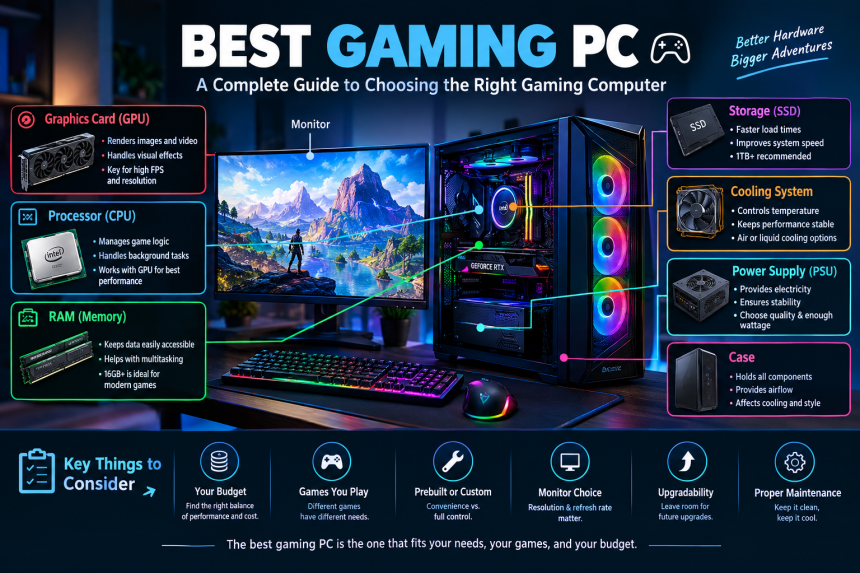
Finding the right gaming PC can feel overwhelming. There are dozens of processors, graphics cards, memory options, storage types, and prebuilt systems competing for your attention. But Choosing the right computer for gaming doesn’t have to be complicated or overwhelming. The right machine is simply one that matches the games you play, the performance you expect, your budget, and how long you want to keep it.
Whether you are buying your first gaming computer or replacing an older system, understanding the important components can save you money and frustration. In this guide, we will explore what makes a gaming PC worthwhile, how the major components affect performance, whether a prebuilt or custom system makes sense, and what you should consider before spending your money.
What Makes a Gaming PC Good?
A capable gaming computer is more than a collection of expensive components. Think of it like a team: every player has a job, and the overall result depends on how well they work together.
The graphics card is usually one of the most important parts for gaming because it handles much of the visual workload. The processor also matters because it manages game logic, physics, background tasks, and other calculations. Memory helps the system keep information readily available, while storage affects loading times and general responsiveness.
A good system should also have adequate cooling and a reliable power supply. Buying an extremely powerful graphics card while pairing it with inadequate supporting hardware can prevent you from getting the performance you expected.
Your monitor matters, too. There is little benefit in building a machine capable of producing extremely high frame rates if your display cannot take advantage of them.
The key is balance. Rather than focusing on the most expensive computer you can afford, ask yourself: “Which system will deliver the gaming experience I really want?”
Understanding the Graphics Card
The graphics card, often called the GPU, is one of the first components gamers should examine. It is responsible for rendering images, lighting, textures, shadows, and other visual elements.
If you enjoy modern action games, open-world adventures, racing titles, or visually demanding releases, a stronger graphics solution can make a noticeable difference.
A powerful GPU can help you play at higher resolutions and graphical settings. It can also provide more headroom for demanding games released in the future.
However, bigger is not always better for every player. Someone playing competitive games at 1080p may have very different needs from someone using a 4K monitor.
Resolution and refresh rate should guide your decision.
For example, a player using a standard 1080p display may not need the same level of graphics hardware as someone targeting 1440p or 4K gaming. Similarly, competitive players may prioritize high frame rates and low latency over maximum visual quality.
Modern graphics cards may also offer technologies such as upscaling, frame generation, and ray tracing. These features can improve visual quality or performance, but their usefulness depends on the games you play.
Before buying, check the requirements of your favorite games rather than choosing a component solely because it has impressive specifications.
Choosing the Right Processor
The processor, or CPU, is another major part of a gaming system. It handles instructions that keep games running and coordinates many activities happening inside the computer.
A modern multi-core processor is generally a sensible choice for a new gaming system. However, you do not necessarily need the most expensive processor available.
Why? Because gaming performance depends on the relationship between the CPU, graphics card, memory, and software.
A balanced processor can provide excellent results without consuming too much of your budget. If you spend heavily on the CPU while using a modest graphics card, you may not see the gaming improvement you expected.
Consider your other activities as well.
If you only play games, your requirements may be different from someone who streams, edits videos, records gameplay, runs virtual machines, or performs other demanding tasks.
For mixed workloads, additional processing power can be useful. For a gaming-focused machine, however, balance is often more important than simply chasing the highest core count.
How Much RAM Do You Need?
RAM, or system memory, allows your computer to keep frequently needed information readily accessible.
For many modern gaming systems, having enough memory is more important than buying an unnecessarily large amount.
A computer with insufficient RAM can become sluggish when games, browsers, voice chat, launchers, and other applications are running simultaneously.
Capacity matters, but configuration matters too.
Using compatible memory modules in an appropriate configuration can help the system operate efficiently. You should also check the memory specifications supported by your motherboard and processor.
If you frequently multitask, stream games, edit media, or keep numerous applications open, having additional memory can be useful.
The important point is not to treat RAM as an isolated upgrade. A computer with enormous memory but a weak graphics card will not suddenly become a high-performance gaming machine.
SSD Storage and Game Load Times
Storage has changed considerably over the years. Solid-state drives have become a standard choice for modern computers because they provide much faster access than traditional mechanical hard drives.
An SSD can make Windows feel more responsive and reduce application and game loading times.
For a gaming computer, storage capacity is also important. Modern games can occupy a significant amount of space, and your collection can grow quickly.
Think about your gaming habits before choosing capacity.
If you only play a few games at a time, a smaller drive may be sufficient. If you maintain a large library, install major expansions, record gameplay, or store other media, additional capacity can make life much easier.
A practical approach is to use a fast primary SSD for your operating system and frequently played games, with additional storage if needed.
The goal is convenience. Constantly deleting games to make room for new ones becomes frustrating very quickly.
Prebuilt vs. Custom Gaming PC
One of the biggest decisions buyers face is whether to purchase a prebuilt computer or assemble a system themselves.
A prebuilt system offers convenience. You select a configuration, purchase it, and receive a machine that has already been assembled and tested. This can be particularly attractive if you have never built a computer before.
Custom systems offer more control.
Building your own machine lets you choose individual components. You can prioritize the graphics card, select your preferred storage, choose a particular case, and plan future upgrades according to your needs.
There is also a learning opportunity. Once you understand how the parts fit together, upgrading your computer later becomes much less intimidating.
That said, building a PC requires research and patience. Compatibility matters, and mistakes during assembly can create unnecessary headaches.
Neither approach is automatically right for everyone.
If convenience and support are your priorities, a well-configured prebuilt may make sense. If customization and hands-on control appeal to you, building your own system can be rewarding.
Cooling and Airflow Matter More Than You Think
Performance components generate heat. When temperatures become excessive, the system may reduce performance to protect itself.
That is why cooling should not be treated as an afterthought.
A good case should provide reasonable airflow, allowing cool air to enter and warm air to leave. Fans, heatsinks, and other cooling components work together to maintain reasonable operating temperatures.
Good airflow is like opening windows in a crowded room.
Even powerful hardware can benefit from a well-designed case and sensible fan placement.
Liquid cooling can be useful in certain systems, but it is not automatically necessary. A quality air cooler can be perfectly adequate for many gaming computers.
You should also keep dust under control. Dust buildup can restrict airflow and reduce cooling efficiency over time.
Regular maintenance does not need to be complicated. Keeping vents clean and ensuring fans can move air freely can help your computer remain comfortable during long gaming sessions.
The Importance of the Power Supply
The power supply unit, or PSU, is one of the easiest components to overlook.
It provides electricity to the computer’s components, making reliability extremely important.
A low-quality or inadequately sized power supply can create problems, especially when paired with demanding hardware.
Do not choose a power supply purely by looking at its wattage.
Quality, efficiency, protection features, and suitability for the rest of the system also matter.
When selecting a PSU, consider the requirements of the processor and graphics card, along with additional components and potential future upgrades.
Leaving some capacity for future changes can also be sensible. You may eventually install a more powerful graphics card or additional drives.
The power supply is not the component to cut corners on simply to save a small amount of money.
Choosing the Right Monitor
A gaming computer and its monitor should be considered together.
The display determines what you actually see, while its resolution and refresh rate influence the gaming experience.
A higher resolution can produce a sharper image, while a higher refresh rate can make motion appear smoother when your system can produce enough frames to take advantage of it.
Ask yourself what type of games you enjoy.
For competitive shooters and fast-paced multiplayer games, smooth motion and responsiveness may be particularly important. For cinematic single-player adventures, you may place greater value on resolution, image quality, and graphical detail.
Panel technology, response time, adaptive synchronization, brightness, and color quality can also affect your experience.
There is no universally perfect monitor because players have different priorities.
The important thing is to make sure your computer and display complement each other instead of spending heavily on one while underusing the other.
How to Choose a Gaming PC for Your Budget
Budget is often the most practical part of the decision.
Instead of setting your budget around a particular brand or component, begin with the experience you want.
Do you want smooth 1080p gaming? Are you interested in 1440p? Do you want high-resolution single-player games? Are you planning to stream while playing?
Answering these questions helps determine where your money should go.
A balanced system usually provides better value than an expensive component surrounded by weak hardware.
For example, spending most of your budget on a premium graphics card while buying an inadequate power supply or insufficient storage can create an unbalanced machine.
You should also account for accessories. A gaming setup may require a monitor, keyboard, mouse, headset, speakers, operating system, and other equipment.
Remember that the computer itself is only part of the complete experience.
Features That Can Extend the Life of Your System
Technology changes quickly, but a thoughtfully selected computer can remain useful for years.
When purchasing a system, consider whether the motherboard provides suitable upgrade options. Additional memory slots, storage connections, and compatible expansion features can make future upgrades easier.
Upgradability gives your computer room to grow.
You do not necessarily need to buy the most powerful system available today. Instead, you can choose a solid foundation and upgrade individual components later.
For example, you might add storage when your game library grows or replace the graphics card when newer games demand more performance.
A clean and organized case can also make future maintenance easier.
Software support matters as well. Keeping drivers and the operating system updated can help maintain compatibility and stability.
Common Mistakes to Avoid
Even experienced buyers can make mistakes when putting together a gaming system.
One common mistake is focusing on a single specification. A large number printed on a product page does not automatically mean better real-world performance.
Another mistake is ignoring compatibility. Components need to work together, including the processor, motherboard, memory, cooling system, case, storage, and power supply.
Do not forget the total cost of ownership.
A computer may look affordable until you realize that you also need a monitor, operating system, accessories, additional storage, and other equipment.
Buying based solely on appearance can also be risky. RGB lighting and stylish cases can make a setup look fantastic, but they do not automatically improve game performance.
Finally, avoid purchasing hardware simply because it is new. Newer technology can be useful, but value depends on what you actually need.
How to Maintain Your Gaming PC
Once you have your computer, taking care of it can help preserve its performance.
Keep the system in a reasonably clean environment and make sure air vents are not blocked. Periodically inspect the fans and remove accumulated dust carefully.
Software maintenance is equally important. Keep your operating system, drivers, and important applications updated when appropriate.
Pay attention to unusual behavior.
Unexpected crashes, strange noises, excessive temperatures, or sudden performance changes can sometimes indicate a problem that is easier to address early.
Avoid placing the computer in a cramped location where airflow is restricted. Give the system enough space for ventilation.
You should also maintain sufficient free storage. A drive that is almost completely full can make general computer management more difficult.
With basic care, a well-built system can provide years of enjoyable gaming.
Final Thoughts
Choosing the right gaming computer is ultimately about matching hardware to your actual needs. You do not need to understand every technical specification or purchase the most expensive components to enjoy modern games.
Focus on the graphics capability, processor, memory, storage, cooling, power supply, monitor, and upgrade potential. Most importantly, consider how those parts work together.
The best setup for you is the one that delivers the gaming experience you want without wasting money on features you will never use. Take your time, compare specifications carefully, and think beyond today’s games so your investment continues to serve you in the future.
FAQs
1. What should I look for first when buying a gaming PC?
Start by considering the games you play, the resolution you want to use, your preferred frame rate, and your budget. From there, pay particular attention to the graphics card and processor while ensuring the remaining components are properly balanced.
2. Is a prebuilt gaming PC better than building one?
Neither option is universally better. A prebuilt computer provides convenience and can be useful for people who do not want to assemble components themselves. Building a system gives you more control over individual parts and can make future upgrades easier.
3. How much RAM is enough for modern gaming?
The appropriate amount depends on the games and other applications you use. A reasonable modern configuration should provide enough memory for your games while leaving room for background programs such as browsers, launchers, and communication software.
4. Does an SSD improve gaming performance?
An SSD can significantly improve loading and general system responsiveness compared with a traditional hard drive. However, it does not replace the graphics card or processor when it comes to rendering game performance.
5. How long can a gaming PC last?
There is no fixed lifespan. A well-built computer can remain useful for several years, although newer games may eventually require upgraded hardware. Choosing components with reasonable upgrade options can help extend the useful life of the system.