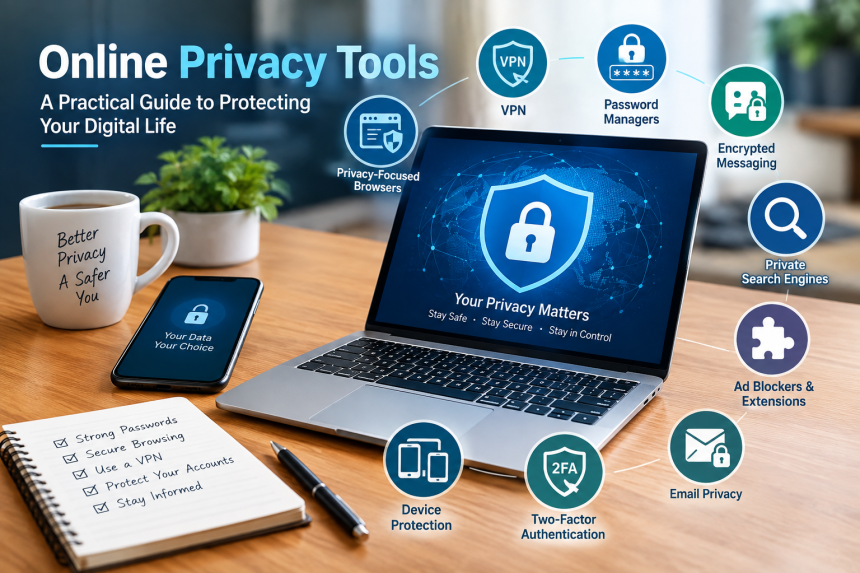
The internet has become an essential part of our everyday lives, shaping how we communicate, work, shop, learn, and connect with the world around us. We shop, communicate, work, study, watch videos, manage money, and store personal information online. While this convenience makes life easier, it also means that a surprising amount of information about us can travel across the internet every day.
Your name, email address, location, browsing habits, device information, and online activities can all reveal something about you. Some of this collection is necessary for websites and services to function. Some is used for advertising and analytics. In other cases, poor security or careless sharing can expose information to people who should not have access to it.
Fortunately, protecting your digital life does not require you to become a technology expert. A combination of sensible habits and the right privacy tools can make a meaningful difference. Think of your online security like protecting your home: you do not rely on a single lock. You use doors, windows, alarms, and good habits together.
This guide explains the main tools available, what they actually do, where their limitations are, and how ordinary internet users can use them effectively.
1. What Does Online Privacy Really Mean?
Online privacy is the ability to have reasonable control over information about you when you use the internet. It includes understanding what information is collected, who can access it, how it is used, and how long it is retained.
Privacy does not mean becoming invisible. That is an important distinction.
When you visit a website, the site may need certain information to provide its service. For example, an online store needs an address if you want something delivered. A banking application needs information to verify your identity. A social network needs account information to maintain your profile.
The issue arises when information is collected unnecessarily, shared without clear understanding, stored insecurely, or used in ways you did not expect.
Privacy and security are connected, but they are not identical.
Security is mainly about preventing unauthorized access, theft, damage, or misuse. Privacy is more about control over information and how it is handled.
For example, a company may have excellent security but still collect a large amount of information about its customers. Conversely, a service might collect very little information but have weak security.
Understanding this difference helps you choose the right tools instead of assuming that one application can solve every problem.
2. Why Should Ordinary Internet Users Care?
You might think, “I have nothing to hide, so why should I worry about privacy?”
Privacy is not only about hiding wrongdoing. It is about having control over your personal life.
Consider how much information can be inferred from ordinary online behavior. Your searches may reveal your interests. Your shopping history can indicate your habits. Location information can reveal where you live, work, or regularly travel. Public posts can expose relationships and personal details.
Even individual pieces of information that seem harmless can become more revealing when combined.
Your digital footprint can grow without you noticing.
A person might create an account on one website, install several mobile applications, accept cookies on dozens of sites, sign into services using a social media account, and connect different platforms together. Each individual action may seem insignificant, but together they create a detailed picture.
There is also the practical risk of identity theft and account compromise. If an attacker gains access to an email account, for example, that account may provide a path to password resets for other services.
Privacy tools cannot eliminate every risk. They can, however, reduce unnecessary exposure and make it harder for unwanted parties to collect or misuse information.
3. Privacy-Focused Web Browsers
Your browser is one of the most important tools in your daily internet experience. It connects you with websites and can store information about your activity, including cookies, browsing history, saved passwords, and other site data.
A privacy-focused browser can reduce some forms of tracking and give you greater control over what websites are allowed to do.
What features should you consider when choosing a privacy-focused browser?
Look for features such as tracker blocking, cookie controls, anti-fingerprinting protections, secure connections, and clear privacy settings.
Some browsers provide stronger privacy protections by default, while others allow you to adjust settings manually.
However, private browsing should not be confused with complete anonymity. A private or incognito window generally prevents certain information from being saved locally after the session ends. It does not automatically make you invisible to websites, internet providers, employers, schools, or other network administrators.
This is a common misunderstanding.
If you use private browsing to search for something, the browser may avoid saving the local browsing history, but the website you visit can still receive information during that connection.
A privacy-focused browser is best viewed as one layer of protection rather than a magic invisibility cloak.
4. Virtual Private Networks and What They Actually Do
A virtual private network, commonly called a VPN, creates an encrypted connection between your device and a VPN server.
When properly configured, this can be particularly useful when you are using networks you do not fully trust, such as public Wi-Fi.
Normally, your internet traffic travels through your network connection before reaching its destination. A VPN adds an intermediary server and encrypts the connection between your device and that server.
Why might someone use a VPN?
Common reasons include:
- Protecting traffic on unfamiliar networks
- Reducing exposure to local network monitoring
- Adding privacy when using public Wi-Fi
- Masking your IP address from websites in some circumstances
- Connecting securely to a private workplace or home network
However, a VPN can enhance your online privacy, but it does not make you completely anonymous on the internet.
The VPN provider becomes an important part of your privacy model. If your traffic passes through its servers, you are trusting that provider to handle your information responsibly.
That means choosing a VPN should involve more than looking at advertisements promising “complete anonymity.” Consider its privacy policy, business model, security practices, reputation, and transparency.
A useful analogy is sending a letter through a trusted courier. The courier can protect the letter while carrying it, but you still need to decide whether you trust the courier.
5. Password Managers: A Simple Way to Strengthen Accounts
Passwords remain one of the easiest ways for online accounts to become compromised.
Many people reuse the same password across multiple websites because remembering dozens of unique passwords is difficult. Unfortunately, this creates a chain reaction.
If one website suffers a data breach and your password is exposed, attackers may try that same password on your email, shopping, social media, or financial accounts.
A password manager helps solve this problem.
Instead of remembering dozens of passwords, you remember one strong master password.
The manager can generate long, unique passwords for individual accounts and store them securely. When you need to sign in, it can fill in the appropriate credentials.
A good password manager can also help identify weak, reused, or compromised passwords.
When choosing one, pay attention to its security design, recovery process, encryption approach, reputation, and compatibility with your devices.
You should also protect the password manager itself carefully. Your master password should be strong and unique.
Where available, combine it with multi-factor authentication for another layer of protection.
The goal is simple: if one account is compromised, the damage should not automatically spread to every other account you own.
6. Encrypted Messaging and Private Communication
Email and messaging services are essential parts of modern life. Unfortunately, not every communication method provides the same level of privacy.
End-to-end encryption is one important feature to understand.
With end-to-end encryption, the message is designed to remain encrypted while traveling between participants, with the intended recipients holding the necessary keys to read it.
This can help protect conversations from interception while they are being transmitted.
However, encryption does not solve every privacy problem.
The application may still have access to account information, metadata, backups, contact information, or other details depending on how it is designed.
For example, knowing that two people communicated at a particular time can sometimes reveal useful information even without knowing what they discussed.
Therefore, private communication involves more than simply choosing an encrypted messaging service.
Users should also think about device security, notifications, backups, account recovery, and who has physical access to their devices.
A secure conversation can still become exposed if the device displaying it is poorly protected.
Use a strong device passcode, keep your operating system updated, and review what information appears on your lock screen.
7. Search Engines and Private Searching
Search engines are incredibly useful, but searching can also create a record of your interests.
People search for everything from recipes and travel destinations to financial questions and personal concerns. That information can potentially reveal a lot about an individual.
Privacy-oriented search services attempt to reduce some forms of tracking and profiling.
Why might someone choose a privacy-focused search engine?
The main reason is greater control over search-related information and reduced personalization based on individual activity.
However, search privacy is only one part of the picture.
If you search privately but then sign into a website and provide your name, email address, or other identifying information, that website can still associate your activity with your account.
This is why privacy should be approached as a complete system.
Instead of asking, “Which one tool will make me private?” ask, “Where is my information going, and what can I reasonably control?”
That small change in thinking can lead to much better decisions.
8. Tracker Blockers, Ad Blockers, and Browser Extensions
Many websites contain third-party technologies that monitor activity for advertising, analytics, personalization, or other purposes.
Some privacy-focused browser extensions can block certain trackers, scripts, advertisements, or other unwanted elements.
These tools can improve both privacy and browsing experience.
They may reduce intrusive advertisements, speed up page loading, and prevent some third-party services from following your activity across different websites.
But browser extensions deserve careful attention.
Installing an extension means giving it certain permissions. A malicious or poorly maintained extension can create more problems than it solves.
Before installing one, check who develops it, what permissions it requests, whether it is actively maintained, and whether it has a credible reputation.
Avoid installing large numbers of extensions simply because they claim to improve privacy.
More tools do not automatically mean more protection.
Sometimes a small collection of reputable tools is safer and easier to manage than a browser filled with dozens of unfamiliar add-ons.
9. Email Privacy and Disposable Addresses
Your email address is often the key that connects many of your online accounts.
Once an address becomes widely known, it can attract marketing messages, unwanted communications, phishing attempts, and other forms of spam.
One practical approach is to separate important communication from low-priority registrations.
Email aliases can help create this separation.
For example, you might use one address for financial services, another for personal communication, and an alias for newsletters or online shopping.
If a particular alias starts receiving large amounts of unwanted mail, you can identify where it was used and potentially disable it.
Disposable addresses can also be useful for temporary situations where you do not want to provide your primary email address.
However, temporary email should not be used for accounts where you may need long-term password recovery.
For important accounts, use an address you control reliably and protect it carefully.
Your main email account deserves special attention because it is often connected to password resets for many other services.
10. Two-Factor Authentication and Device Protection
Even the strongest password can sometimes be exposed.
Two-factor authentication, or 2FA, adds another verification step when you sign in.
The idea is straightforward: instead of relying only on something you know, such as a password, you also use another factor.
This could involve an authentication application, a security key, or another supported verification method.
Why does this matter?
Imagine someone obtains your password through a data breach or phishing attack. Without additional protection, that password may be enough to enter your account.
With properly configured multi-factor authentication, the attacker may still need the second factor.
Security keys are particularly useful for protecting high-value accounts because they are designed to resist many common phishing techniques.
You should also protect the devices themselves.
Keep operating systems and applications updated. Use screen locks. Enable device encryption where available. Install software from trustworthy sources. Review application permissions regularly.
Remember that your phone and laptop are not just machines. They are containers for your digital identity.
11. Building a Practical Privacy Routine
The biggest mistake people make is searching for one perfect privacy tool.
There isn’t a single application that can protect everything.
A better approach is to build a simple routine.
Start with your most important accounts.
Protect your primary email account with a unique password and multi-factor authentication. Do the same for financial services, cloud storage, and other accounts containing valuable information.
Next, review your browser settings. Remove extensions you no longer need. Check which websites have permission to access notifications, location, camera, microphone, and other features.
Then review your phone.
Look through installed applications and ask yourself whether each one really needs the permissions it has. An ordinary flashlight application, for example, should not normally need access to your contacts.
You should also examine account privacy settings.
Many services allow you to control advertising preferences, location history, connected applications, public profile information, and other settings.
Small improvements can add up.
You do not need to spend an entire weekend changing every setting on every device. Start with the areas that matter most.
A useful routine might look like this:
- Use unique passwords for important accounts.
- Store passwords in a reputable password manager.
- Enable multi-factor authentication.
- Keep devices and applications updated.
- Use secure connections on unfamiliar networks.
- Review app permissions.
- Limit unnecessary location access.
- Remove accounts you no longer use.
- Be cautious with unexpected links and attachments.
- Think carefully before sharing personal information publicly.
Privacy is not a one-time project. It is more like brushing your teeth. A few minutes of attention on a regular basis can prevent much bigger problems later.
Conclusion: Make Privacy Part of Everyday Internet Use
Online privacy can sound complicated because the internet itself is complicated. But protecting yourself does not require expert-level technical knowledge.
The most effective approach is usually a combination of ordinary habits and reliable tools. A privacy-conscious browser, secure passwords, a password manager, encrypted communication, multi-factor authentication, careful app permissions, and sensible network practices can all contribute to a stronger digital environment.
No tool provides perfect protection, and no privacy setting can eliminate every risk. The goal is to reduce unnecessary exposure and give yourself more control over your information.
Start small. Secure your most important accounts first, review your devices, remove unnecessary permissions, and learn what the services you use actually collect.
The internet will continue to change, but one principle remains useful: the more you understand about where your information goes, the better prepared you are to decide what you are comfortable sharing.
Frequently Asked Questions
1. What is the most important privacy tool for everyday internet users?
There is no single tool that handles every privacy concern. A password manager, strong unique passwords, multi-factor authentication, updated devices, and a privacy-conscious browser can provide useful protection when used together.
2. Does a VPN make me completely anonymous online?
No. A VPN can encrypt traffic between your device and the VPN server and can hide your IP address from some destinations, but it does not eliminate all forms of tracking. Websites can still identify users through accounts, cookies, browser characteristics, and other information.
3. Is private or incognito browsing completely private?
No. Private browsing mainly limits what your browser stores locally after a session. It does not automatically hide your activity from websites, network operators, employers, schools, or internet service providers.
4. Should I use the same password for several websites?
It is better to use a different, strong password for every important account. A password manager can make this practical because it can create and remember unique credentials without requiring you to memorize all of them.
5. Can online privacy tools protect me from every cyber threat?
No. Privacy tools can reduce certain risks, but they cannot prevent every attack. Good security also depends on careful behavior, software updates, strong authentication, secure devices, and recognizing phishing attempts and suspicious communications.